Stop waiting on reports. Start deciding today.
OIntelligence turns Odoo into the place your team gets its numbers — no export, no ticket to IT, no two-day wait. Every figure is computed live, as the person asking, so what used to take days now takes minutes.
Nothing is charged until the trial ends. Cancel any time before.
Revenue sale.report
Confirmed orders
Average order
Unpaid invoices
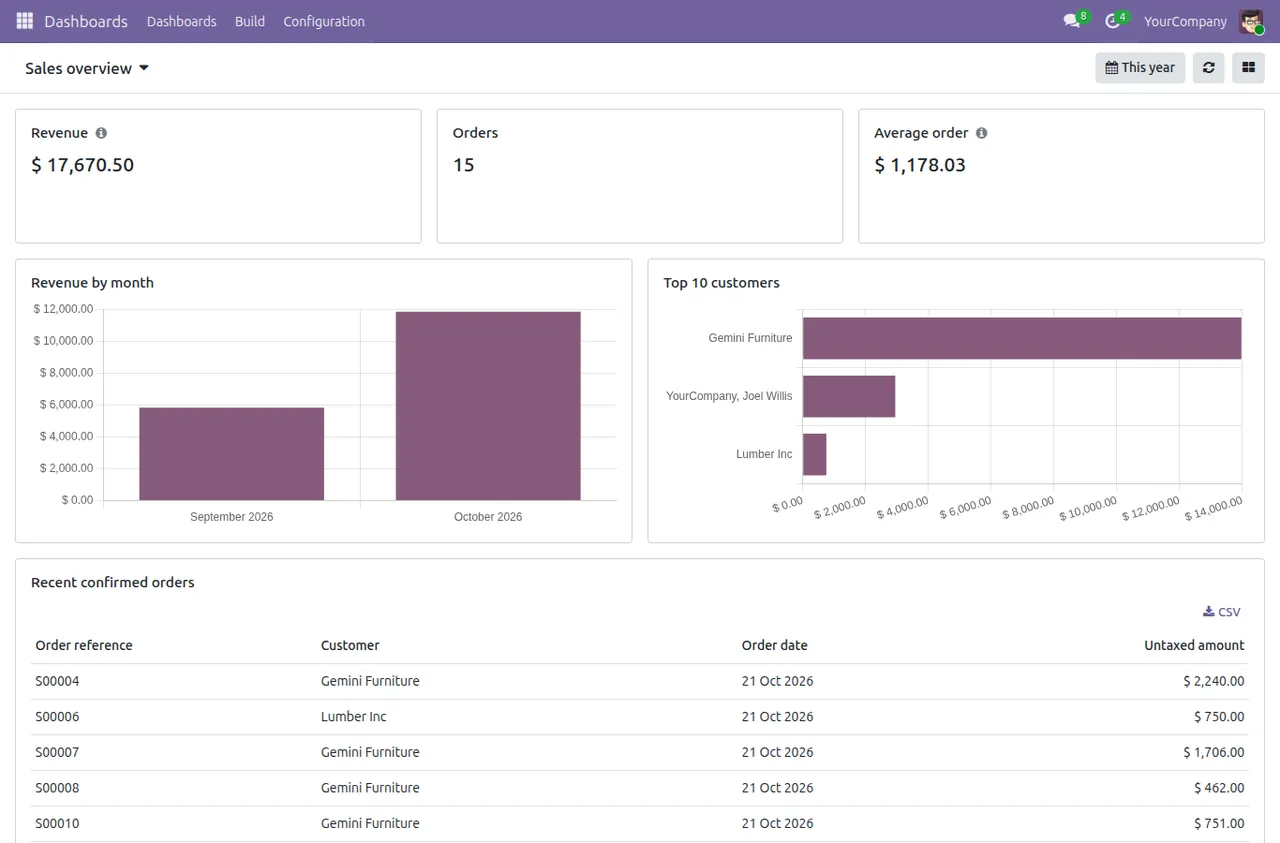
Revenue by month Click a bar to open the orders
Top salespeople
| Salesperson | Revenue |
|---|
sale.order record rules for Omar.of your business data are sent to our service. Ever.
to serve a cached widget, whatever the data volume.
Community and Enterprise, self-hosted, Docker or Odoo.sh.
free trial with every feature. Nothing charged until it ends.
Most Odoo dashboards
skip your security.
Raw SQL dashboards read tables directly, so a salesperson who may only see their own orders can see everyone's totals through a shared chart. OIntelligence reads through Odoo's ORM, as the viewer, every time.
Fast to build, wrong for half your team
- Record rules and multi-company are bypassed, so one dashboard can't safely serve every role.
- You end up cloning dashboards per team and filtering by hand.
- Restricted users still scan the whole table, so their widgets are slower.
Computed as the viewer, inside Odoo
- Every read goes through the ORM with the viewer's record rules and allowed companies.
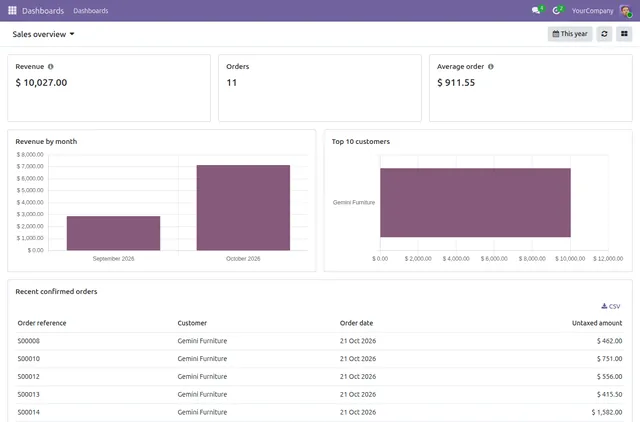
- Share one dashboard with the whole company. Each person sees the totals they're allowed to see.
- The rule's own filter makes restricted widgets fast: 44 ms instead of 677 ms in our test.
From an Odoo model
to a live dashboard.
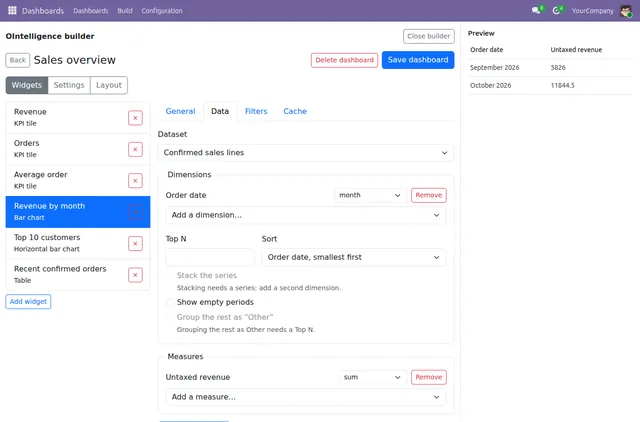
Pick a model, choose fields with Odoo's own field and domain editors, drop widgets on a 12-column canvas and share it. No SQL, no exports, no developer tickets.
Datasets without a line of code
Choose any Odoo model you can read and tick the fields you need, including related paths like the customer's country. Filters use Odoo's own domain editor, so they behave exactly like the rest of Odoo.
- Odoo's field selector and domain editor, not a look-alike
- Company-currency measures from Odoo's reporting models
- Datasets on models a viewer can't read show "access restricted", not an error
dateDateuser_idMany2onepartner_id.country_idMany2oneprice_totalMonetarymarginMonetaryNine widget types, ready for real reporting
KPI tiles, bar charts in both directions, line, area, doughnut, plain and grouped tables, and sticky notes for context. Every widget computes inside Odoo with the viewer's rights.
- KPI tiles with period comparison
- Grouped tables with totals and paginated detail
- Export tables straight from the dashboard
Ask the next question in one click
Dashboard filters apply to every widget at once. Click a bar or a row and Odoo opens the underlying records in a normal list view, filtered to exactly what that number counted.
- Date ranges, teams, companies and any field you add
- Drilldown opens real Odoo records, not a copy
- The records you see are the records you're allowed to see
| Order | Customer | Total |
|---|---|---|
| S04112 | Gulf Retail LLC | $48,200 |
| S04097 | Marina Foods | $31,950 |
| S04088 | Desert Logistics | $27,400 |
| S04061 | Al Noor Trading | $19,875 |
Your layout, your team's rights
Arrange widgets on a responsive 12-column grid. Each person can keep their own layout of a shared dashboard without changing anyone else's, and three roles decide who views, builds and administers.
- Per-user layouts on shared dashboards
- Share with users or Odoo groups
- Viewer, Builder and Administrator rights
Start from a template, live in minutes
About ten starter dashboards built on Odoo's own sales, invoicing and purchase reports. A template shows as available only when the Odoo apps it needs are installed, and installing one gives you an editable copy.
- Built on
sale.report,account.invoice.report,purchase.report - Every template is checked against Odoo 13 to 20 field names before release
- Included in the plan, no extra charge
saleInstallaccountInstallpurchaseInstallcrmInstallstockNeeds InventoryhelpdeskNeeds HelpdeskFast on large databases
Results are cached per set of access rights, so two people with identical rules share a result and nobody ever sees someone else's. Choose per widget: always live, cached for a time, or refreshed on a schedule.
- Cache hits in 3–5 ms at any volume
- Reads go to your read replica if you have one
- Every widget query has a time limit, so one heavy chart can't stall Odoo
db_replica_host for dashboard readsOdoo 18+See it working
What changes once a team is live
less time spent chasing ad-hoc exports, reported by teams partway through their trial.
from opening the builder to a dashboard the whole team can see.
IT tickets for “can you pull this for me” once rollout is done.
of your rows computed and kept on your own server, every single read.
Figures reflect patterns reported during the 14-day trial by early adopters, not a guarantee for every database.
We build the dashboards.
Odoo keeps the data.
Queries run in your database and results stay there, even while you design in the builder. Our service holds your licence and dashboard definitions, and nothing else. Read exactly what we receive.
Everything that matters
Only what the builder needs
The module only runs query plans our service signed, and a plan can never show anyone more than they could already read in Odoo.
The module checks in once a day. If our service can't be reached, dashboards keep working for a grace period of about four days.
Paddle is the merchant of record. Card details, invoices and tax records stay with Paddle.
Security that makes
dashboards faster.
We benchmarked one widget on 1,000,000 sales order lines as two real, non-admin users. Reading through record rules lets PostgreSQL use the rule's own index, so a restricted rep's widget is quicker, not slower.
faster for a restricted rep than SQL over the whole table (44 ms vs 677 ms).
faster when a manager-scale widget is served from the cache.
Restricted rep · revenue by month
Sales manager · same widget
Test database on our own hardware. Your numbers depend on your server, data and rules.
Three roles, the same payoff.
Composite quotes built from the outcomes trial teams describe most often, not individual customer data.
“I used to wait two days for IT to rebuild the regional view every Monday. Now I open Odoo and it's already there, filtered to what I'm allowed to see.”
“Closing the month used to mean reconciling five exported spreadsheets. The dashboard and the ledger read the same numbers now, so that step is just gone.”
“Every chart request used to land on my desk as a dev ticket. Builders use the same field picker they already know from Odoo, so most of that queue disappeared.”
Subscribe today, dashboards this afternoon.
Sign-up, checkout, your build and your licence are all self-serve. No sales call, no waiting for us.
Start your trial
Sign up with your e-mail and start the 14-day trial at checkout.
/signupRegister your database
Tell us where Odoo runs. We prepare a build of the module just for you.
self-hosted · Odoo.shInstall the module
Download it, or add it to your Odoo.sh project as a private git submodule.
dxl_ointelligence_saasActivate and build
Paste your licence key in Settings, install a template and share it.
Settings › OIntelligenceOne plan.
Everything included.
Priced per production database, not per user, so the whole company can view dashboards without you counting seats. Test databases are included.
Pro
per production database
- Unlimited dashboards, widgets and viewers
- All starter templates
- 2 test databases with each production database
- Community and Enterprise, self-hosted, Docker or Odoo.sh
- New versions of the module while you're subscribed
Prices exclude tax. Paddle adds any VAT or sales tax at checkout.
How the 14-day trial works
- Day
1Start with every featureEnter payment details at checkout. Nothing is charged today.
- Day
2–13Build and shareInstall templates, build your own dashboards and invite your team.
- Day
14DecideKeep going and your subscription starts. Cancel before then and you pay nothing.
Questions, answered.
Will a salesperson see their colleagues' numbers?
Only if Odoo already lets them read those records. Every figure is computed as the viewing user, with their record rules and companies.
Does my data leave my server?
No. Queries run in your Odoo and results stay there. The Security page lists exactly what the module sends.
Which Odoo versions are supported?
Odoo 13 to 20, Community and Enterprise, self-hosted, Docker or Odoo.sh. Odoo Online is not supported because it doesn't allow third-party modules.
What happens if your service is down?
Dashboards keep working for a grace period of about four days after the last successful daily check-in.
Is it on the Odoo Apps Store?
No. Each customer receives their own build directly from us, by download or through a private git repository for Odoo.sh.
Give every person in Odoo the right numbers.
14 days free with every feature. Your data never leaves your server.